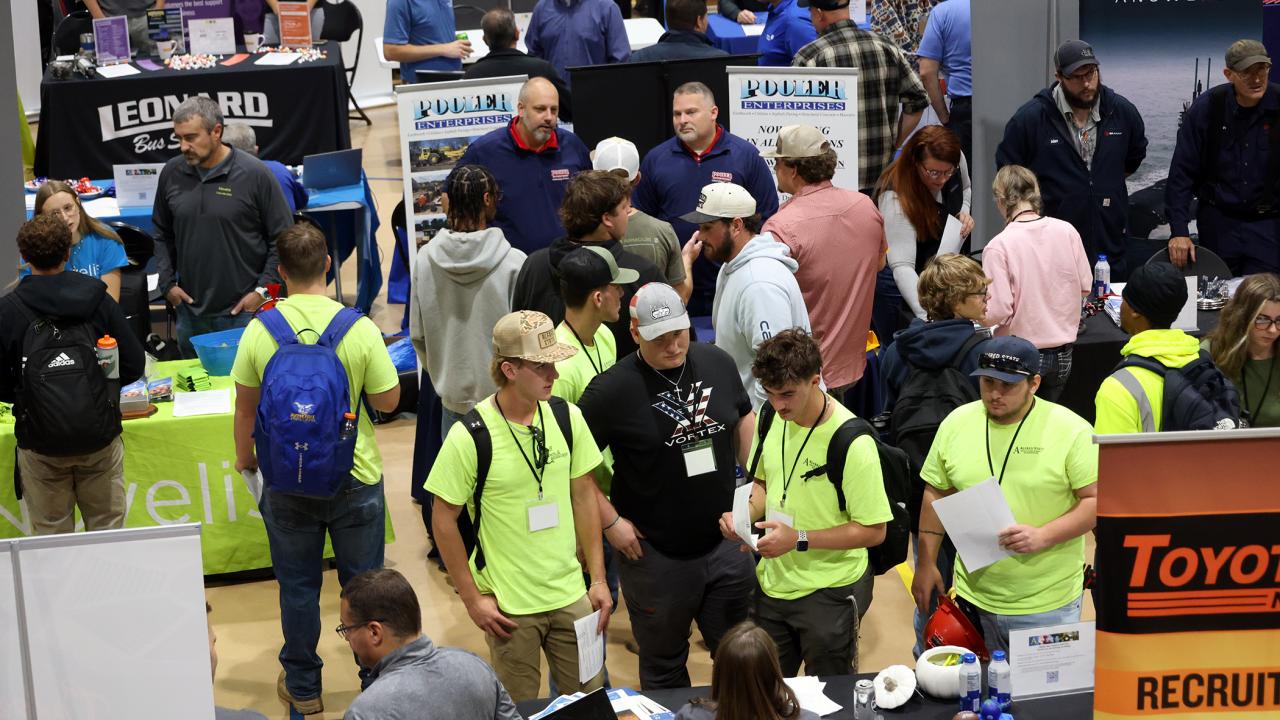
Picture of the Day
The Wellsville Career Fair featured over 100 employers.
Quick Thought
Today is Dictionary Day!
Contribute a possible Picture of the Day and/or Quick Thought by emailing WelkerPM@alfredstate.edu
Daily Announcements
Select a category for related items in reverse chronological order.
Tell us your thoughts! Strategic Planning Survey
Gregory SammonsOct. 13, 2026
Alfred State is developing its next strategic plan. Over 3 separate listening sessions and 105 participants / comments, we have identified 14 emerging themes. This brief 11-question survey takes only 6-8 minutes to complete and asks whether the themes accurately reflect the conditions we should consider. There are no right or wrong answers. Please lend your voice to our landscape analysis: Strategic Planning - Campus Landscape Verification Survey – Fill out form
**NEW** Acceptable Use of Artificial Intelligence Technologies Policy
Kayleigh JonesOct. 8, 2026
Alfred State has implemented a new Artificial Intelligence (AI) Policy to provide guidance on the responsible, ethical, and appropriate use of AI technologies across the campus community. We encourage all students, faculty, and staff to review the policy and familiarize themselves with its expectations and requirements.
Click here for the HR SharePoint PDF.
CITE Social & Tech Talk: Explore Lumi AI for students
Deepa DeshpandeSep. 24, 2026
Friday, September 25 · 2:30–4:00 p.m. · EJ 106 & Teams
This month's Tech and Pedagogy Talk will feature discussion and presentation around (i) Lumi AI for Students— a new AI study partner that resides within your My Learning Environment. This tool is being piloted by SUNY, and Alfred State is participating this Fall. (ii) New flexible pathways to professional development offered by CITE.
Drop in to:
- learn about the LUMI student beta and ask questions,
- explore possible classroom uses and sign up during the session if you would like to try it.
- learn how to collaborate with CITE to implement micro-innovations in your classroom and earn PD credits,
- explore peer communities and sign-up in-session
Technology, snacks, coffee, and colleagues—all in one place. Participation earns you 5 points toward the Annual CITE Excellence in Professional Development Certificate and Award.
Limited seats! Ask to enable Lumi for students AI helper in My Learning
Deepa DeshpandeSep. 22, 2026
MEET LUMI FOR STUDENTS (BETA)
Lumi for students is a new AI study partner from D2L Brightspace, that Alfred State is piloting in online and hybrid courses this Fall through SUNY. Students can ask it about a problem they are stuck on and, and instead of solving it for them, Lumi asks questions, offers hints, and helps spot exactly where your thinking went off track — the way a good tutor would.
WHAT'S IN IT FOR YOUR STUDENTS
• Help when they need it — including 11 pm the night before, when office hours aren't an option
• Practice that builds what exams actually test: reasoning, not recall
• An AI tool in a safe environment approved by the College and SUNY.
WHAT WE'LL ASK YOU TO DO
• Set up Lumi as a study helper for your students
• Complete a short survey at the start and the end (about [10] minutes each)
• Attend virtual synchronous training session(s) or review asynchronous resources to begin using it
WHO WE'RE LOOKING FOR
• Any instructor teaching an online or hybrid course with substantial My Learning presence
• No AI experience required — skeptics are especially welcome
• Someone willing to be honest, including telling us when Lumi is confusing, unhelpful, or wrong. That feedback is the whole point.
GOOD TO KNOW
Spots are limited. Sign up this week by completing this short form or just email cite@alfredstate.edu
Questions? Contact cite@alfredstate.edu
Prepare Your Classrooms and Labs Before Classes Begin
Jamie PanettaAug. 25, 2026
While many campus spaces are quieter during the summer months, Technology Services has been hard at work preparing classrooms, labs, and instructional technology spaces for the start of the semester. While we've worked hard to ensure everything is ready for day one, we encourage faculty to visit the classrooms and labs they'll be using well before classes begin.
During your visit, please take a few moments to:
- Test classroom presentation equipment and instructional technology.
- Familiarize yourself with projectors, displays, microphones, document cameras, and other room-specific features.
- Confirm any specialized software, equipment, or resources needed for your courses are available and functioning as expected.
- Verify that your presentation materials and applications open correctly on classroom computers.
We've checked a lot of things over the summer, but with the multitude of classrooms and labs, an increasingly wide variety of technology, and countless unique course requirements, an extra set of eyes never hurts. Every course has its own needs, and a quick walkthrough before classes begin can help identify anything that may need attention. After all, technology has an uncanny ability to behave perfectly until five minutes before the start of class.
If you encounter any concerns, please contact the Help Desk so we can address them before the semester gets underway.
Welcome back and thank you for helping us ensure a successful start to the semester!
Transition to Cloudflare One VPN by August 27, 2026
Scott TilleyAug. 20, 2026
As part of our ongoing efforts to improve security and remote access services, Alfred State will retire the legacy VPN solutions (Windows VPN and FortiClient VPN) on August 27, 2026. After this date, these VPN solutions will no longer provide access to college resources.
All faculty and staff should begin using the new Cloudflare One VPN solution as soon as possible to ensure a smooth transition and identify any access issues before the retirement date.
Resources:
- Cloudflare One Setup and User Guide: [LINK TO DOCUMENTATION]
- Report Issues / Request Assistance: [LINK TO TDX TICKET FORM]
If you have concerns about application access, workflow requirements, or experience any issues while testing Cloudflare One, please contact the Help Desk at 607-738-4357 or HelpDesk@alfredstate.edu as soon as possible. Early testing will help ensure any access gaps are identified and resolved before the August 27 transition date. If training is needed on how to use Cloudflare One, please put in a Help Desk ticket and our team will reach out to schedule an appointment.
Thank you for your cooperation as we modernize and secure remote access services.
New links for library databases and database resources
Janelle VarinAug. 18, 2026
In an effort to improve sustainability of the library's online resources, the Library and Technology Services teams have moved the library database authentication system to a vendor-hosted server. What this means for library users is our database links and eBook/article permalinks have changed! The database links and permalinks on our website reflect that change, but any links you have saved may no longer work. Please reach out to library@alfredstate.edu if you need help tracking down a saved resource you can no longer access.
New links for library databases and database resources
Janelle VarinJun. 9, 2026
In an effort to improve sustainability of the library's online resources, the Library and Technology Services teams have moved the library database authentication system to a vendor-hosted server. What this means for library users is our database links and eBook/article permalinks have changed! The database links and permalinks on our website reflect that change, but any links you have saved may no longer work. Please reach out to library@alfredstate.edu if you need help tracking down a saved resource you can no longer access.
Old Portal Shutdown Notice
C.J. RahrMay. 11, 2026
The old portal, my2.alfredstate.edu, will be shut down on May 18, 2026. Please make sure to download and save any documents you wish to keep before that date. Thank you.
L.I.F.T. Workshop: MS PowerPoint & Adobe Express for Extended Experience Learning.
Deepa DeshpandeApr. 22, 2026
Join Us this Wednesday April 22, 1:30 pm to 2:30 pm in EJ Brown 106 for a L.I.F.T. Workshop - MS PowerPoint & Adobe Express for Extended Experience Learning.
This session will highlight practical ways to create engaging presentations, visual materials, and student-ready content that can be used for reflection, storytelling, project showcases, and experiential learning activities. Whether you are new to these tools or looking for fresh ideas, this workshop will offer useful strategies you can apply right away.
— CITE Team
Join us for a Faculty Showcase and Roundtable Conversation on Mentor AI and Visible AI
Deepa DeshpandeMar. 25, 2026
Join us this Thursday, March 26, at 11:30 am, for the second roundtable conversation featuring two use cases each, of Mentor AI and Visible AI assignments. While both platforms provide guided access to tools like ChatGPT, Gemini, and Claude to support student AI Literacy and Academic Integrity, they function somewhat differently:
- Visible AI (VAI) is intentionally designed with academic integrity at its core.
- Mentor AI offers a broader student-facing ecosystem and learning support environment.
Together, they raise important questions we’ll explore:
- How can both platforms support academic integrity while enabling responsible student use of AI?
- How do we design assignments that build AI literacy, not dependency?
- What does effective, transparent AI integration look like in practice?
Roundtable 2
- Thursday, March 26
- 11:30 AM – 12:30 PM
- EJB 106 + Microsoft Teams
Key takeaways: Participants will
- Learn from peers across disciplines
- Ask questions and exchange ideas
- Explore novel prompt designs and creative use cases
- Compare features and approaches across platforms and LLMs
For a preview of upcoming CITE Workshops download CITE Calendar Spring 2026.
For CITE Program descriptions and preview of available Certificates download CITE Programming Menu 2025-26.
- CITE Team
L.I.F.T. Workshop: Planner & Loop - Managing Projects using Microsoft
Deepa DeshpandeMar. 4, 2026
Join Us this Wednesday March 4, 1:30 pm to 2:30 pm in EJ Brown 106 for a L.I.F.T. Workshop -exploring Planner and Loop, two powerful tools that make project management simpler, more collaborative, and more transparent.
In this interactive session, you’ll learn how to:
- Organize tasks and track progress with Planner
- Collaborate in real time using Loop components
- Streamline team communication and project workflows
- Integrate these tools seamlessly within Microsoft 365
Whether you manage courses, committees, or campus projects, this workshop will give you practical strategies you can start using immediately. Bring your laptop and be ready to explore!
Facilitator: Christina Kent
-CITE Team
Invitation to Explore Visible AI Platform
Deepa DeshpandeFeb. 17, 2026
Dear Faculty members of Alfred, Wellsville and Northland campuses,
We invite you to promote your students' AI Literacy and Academic Integrity concurrently, by giving them secure access to pro versions of multiple LLMs including ChatGPT, Gemini, and Claude, through the Visible AI platform that Alfred State is piloting this semester. The platform is available as an external learning tool in My Learning, and faculty can start using it right away, within their assignments. Watch this 2-minute video demo to get a preview of how to use it. https://asc-cite.com/VAIDemoVideo
Interested? Next Steps:
- Complete this short form to let us know the CRN of your course, so that we can copy over, a help module for your students into My Learning. Visible AI Pilot Interest Form for faculty
- Complete this VAI Faculty Usage Log survey to document issues you face and aha moments when things worked well for you or your students. You can fill the form as often as you wish.
- Visit Visible AI Pilot: Spring 2026 Campus Rollout Share Point page for more information.
- Visit Visible AI Pilot | Channel on CITE Team space for 24x7 support and communication.
Upcoming Training Workshop:
📅 Thursday, Feb 19
🕚 11:30–12:30 pm
📍 EJ 106 + Teams
Drop by the CITE Office (EJ 106) anytime for questions or clarifications, Or Email cite@alfredstate.edu.
Let us Lead the way in responsible AI integration together!
We’re chilling out for winter break! (Help Desk hours below) ⛄
Jamie PanettaJan. 12, 2026
❄️ We’re chilling out for winter break, and the Help Desk is getting cozy. ☃️
Winter Break Help Desk Hours (starting this weekend):
- Weekdays: 8:00 a.m. to 4:00 p.m.
- Weekends: 1:00 p.m. to 5:00 p.m.
Need us? No worries! We’re here, bundled up and ready to help!
Starfish Attendance Update - Part of Term Courses
Casey CowburnJan. 9, 2026
Thank you Eric Wilmot and Deb Claire for your information/work on this. Faculty of Part of Term courses will now be able to enter attendance for dates within the Part of Term! In the past, Part of Term faculty would need to scroll through days that do not representative of the course availability. Starting this Spring, faculty will only see available days based on the part of term range.
If anyone would like assistance with setting up, entering or editing attendance don't hesitate to reach out for training (cowburc@alfredstate.edu). Have a great Spring term!
Holiday request to pause new projects and non-urgent requests
Jamie PanettaDec. 29, 2025
In support of President Mauro's initiative to allow campus-wide flexibility during the holiday period, Technology Services is requesting a pause on new project submissions and non-urgent service requests from Monday, December 22 through Friday, January 2, 2026. This brief pause will help us maintain essential services while accommodating remote and flexible work schedules.
What this means:
- Please hold new project proposals, enhancement requests, scheduled deployments, and other non-critical work items until at least Monday, January 5, 2026.
- Active projects will continue where needed to sustain operations, meet set deadlines or meet regulatory requirements.
- Urgent, time-critical issues will still be addressed as quickly as possible. Please route urgent incidents to the Help Desk and indicate that they are indeed urgent.
We ask that if you have a project or non-urgent request ready to submit, please queue it for after the holidays. We will resume normal intake and scheduling on Monday, January 5, 2026.
Thank you for your partnership and understanding during this brief adjustment. Your support helps us keep essential services running smoothly while providing flexibility for a much-needed pause for our team.
🎄 From all of us, have a fantastic holiday season! May your days be merry and your Wi-Fi strong! 🎄
Public debate on AI monitoring software
Nicholas StefanskiDec. 1, 2025
Please join the English & Humanities department and the Debate Club for a brief student debate followed by an open public forum at 1:30 pm - 2:45 pm Tuesday, Dec 2 in the SLC small events space.
Resolved: "Alfred State College should procure proprietary software tools to monitor and deter improper use of artificial intelligence in academic work."
Pizza will be served. We hope to see you there!
Help Desk and Plotter Room Thanksgiving Break Hours
Ryan FranceNov. 25, 2025
The Alfred State Help Desk will be open the following days and hours during Thanksgiving Break
Wednesday (11/26) - 8am to 4pm
Thursday (11/27) - CLOSED
Friday (11/28) - 8am to 4pm
Saturday (11/29) - 1pm to 5pm
Sunday (11/30) - 1pm to 5pm
(We will return to our regular semester schedule on Monday 12/1)
The Plotter Room will be closed during the break, if you need to access the Plotter Room for academic purposes reach out to the Help Desk during the week within their open hours to have someone let you in.
2025 NDLW Thursday Friday
Ronald GoodNov. 7, 2025
Join us for NDLW 2025. This year's theme is The Great AI Disequilibrium, so if you have felt a little shaken by all of the rapid changes and need some help finding your balance, we have a full week of free programming to help.
Free Registration (register as guest if you are not already a member):
https://members.usdla.org/members/evr/eventreg_login.php?mid=2786379639&evid=53186007&md=&
Each day starts at 11am ET with some of the USDLA Crew, including Farah Bennani and Kae Novak hosting the Online Daily Show, a chance to network and discuss topics of the day. Bring your ideas, questions, and a beverage. The end of the week's schedule is as follows:
Thursday November 6
10:00-10:45AM EST
Title: Side Quests in Your Online Course
Presenter: Jennifer Shloming, Fashion Institute of Technology
Description: Side quests are optional activities that let students spark their curiosity in a topic that may not be covered during class, which can earn them a bonus and develop skills.
12:00-12:45PM EST
Title: Accessible Course Content Checklist
Presenter: Allene Slating, Senior Instructional Designer, SUNY Online Teaching
Description: Are you an instructional designer, faculty member, or anyone involved in creating accessible course content? Join us for a webinar on how to use an optional accessibility checklist to help ensure your digital materials are accessible to all learners.
In this session, we will:
- Introduce and review the optional Accessible Course Content Checklist
- Demonstrate how it can be applied to a course or adapted to meet specific campus needs
- Highlight important points and tips for creating accessible digital content
*Note: This session will be the same as November 5th. Duplication is intentional to accommodate the varying teaching schedules of our audience.
1:00-1:45PM EST
Title: Case Studies: Working with Faculty on Title II Compliance
Presenter: Claudia Cafarelli – Nassau Community College
Description: View examples of case studies working with faculty to update teaching materials and make them compliant with Title II, from easy fixes to complex tables and PowerPoints. We’ll share how to help faculty design a plan for editing.
Friday November 7
10:00-10:45AM EST
Title: Creating Friction: Using Multi-Media Assignments in Online Courses
Presenter: Rachel Rigolino, SUNY New Paltz
Description: This presentation examines how the instructor transformed a standard assignment — an annotated bibliography — into a multimedia assignment. The original purpose was to circumvent student overreliance on abstracts and surface reading and encourage students to actually read sources and evaluate them. In the age of AI, these multimedia assignments have proven to be even more valuable.
11:00-11:45AM EST
Title: Strategies to Design for Student Engagement and Belonging in Online Courses
Presenter: Stephanie Foote, Stony Brook University
Description: Student engagement and sense of belonging are shaped by initial class experiences or class beginnings (Lange, 2016). While there are strategies faculty can use to maximize the beginning and end of synchronous class meetings, this session will focus on four approaches faculty can take to be intentional about the design of the beginning of their synchronous or asynchronous online course(s) in a broader sense. Specifically, we will explore pedagogical approaches that can be implemented to communicate belonging and engagement before and during the early part of a course. Participants will leave with specific ideas that can be implemented, immediately, in their own online courses.
Outcomes:
- Describe the importance of class beginnings on student engagement and belonging in online courses.
- Analyze four approaches that can be implemented to foster student engagement and belonging.
- Identify at least one approach to implement in your own course(s).
Print Black and White in the Library again!
Janelle VarinNov. 6, 2025
Good news, campus community! The black and white printer in the Library is up and running! You can use it to print from a Library computer or your personal device. (Should you ever need to print in black and white from a color printer again, there is a way to get charged the black and white price, saving you money. Look for the "Color" or "Color Mode" dropdown menu and change the setting to Black and White. You may need to open "Printer Properties" if you do not see this option. A librarian is always available to help with this!)
2025 National Distance Learning Week - Tuesday
Ronald GoodNov. 4, 2025
Join us for NDLW 2025. This year's theme is The Great AI Disequilibrium, so if you have felt a little shaken by all of the rapid changes and need some help finding your balance, we have a full week of free programming to help.
Free Registration (register as guest if you are not already a member):
https://members.usdla.org/members/evr/eventreg_login.php?mid=2786379639&evid=53186007&md=&
Each day starts at 11am ET with some of the USDLA Crew, including Farah Bennani and Kae Novak hosting the Online Daily Show, a chance to network and discuss topics of the day. Bring your ideas, questions, and a beverage. Tuesday and Wednesday's schedule are as follows:
Tuesday November 4
12 pm Noon ET
AI: Friend or Foe for Learning & Development?
Michael Lampe, UCHealth and Adam Barragato, Bien-Air Medical Technologies
1 pm ET
Reframing RSI: Your Best Defense Against AI Misuse
Marcus Popetz, Harmonize and Alyson Mike
Wednesday November 5
12 pm Noon ET
Finding the Balance: Addressing the AI Disequilibrium
Matt Stilwell, Front Range Community College
1 pm ET
Creating the Conditions for Student Voice and Agency in Online Learning
Dr. Heather Young,University of Florida; Debra Olbeding,Yellowdig; Victoria Dela Cruz, Yellowdig and Alessandra Puilen, Yellowdig

Fall 2025 National Distance Learning Week
Ronald GoodNov. 1, 2025
Join the ASC Center For Online Learning in celebrating National Distance Learning Week (NDLW) 2025. The week-long event from Nov 3rd to the 7th brings greater awareness and appreciation for distance learning, discusses emerging trends, highlights best practices, and recognizes leaders in the field.
The event sponsored by the United States Distance Learning Association offers several free live webinars each day. This is the 19th annual event, and this year's theme is The Great AI Disequilibrium.
How to Participate
- Registration: Participation is free, and interested individuals can register for events through the USDLA website or specific institutional pages.
- Join the Sessions: Attendees can join the webinars via provided links, with no prior registration required for some sessions.
Live Virtual Sessions for Monday November 3rd are:
11:00am - 12:00pm | Online Daily Show
12:00pm - 1:00pm | AI: The Great Disequilibrium Panel
1:00pm-2:00pm | AI for All Minds: Lessons from Neurodiversity to Transform Learning
Free Google AI Courses for Students, Faculty & Staff
Deepa DeshpandeSep. 30, 2025
Unlock free Google AI courses through SUNY! Learn AI basics and effective prompting—open to all students, faculty, and staff. Enroll with your SUNY email and learn at your own pace! SUNY has partnered with Google to offer free, self-paced AI courses for our entire community.
What’s included
- Google AI Essentials – Understand core AI concepts and how they’re used across industries.
- Google Prompting Essentials – Learn proven strategies to communicate effectively with AI tools.
How to enroll (takes 2 minutes)
- Create or sign in to Coursera with your SUNY email address.
- Enroll in Google AI Essentials and/or Google Prompting Essentials and learn at your own pace.
(If you already have a Coursera account with your SUNY email, you’re set—no new account needed.) SUNY
Why it’s worth it
- Students: Build AI literacy and job-ready skills.
- Faculty: Explore teaching enhancements (e.g., AI-supported rubrics, tutoring, and workflow ideas).
- Staff: Boost everyday efficiency with responsible AI use.
Get started
Visit the SUNY + Google AI page to enroll today. For questions, contact cite@alfredstate.edu or drop by EJ 104/106.
SUNY Online Fall Webinar Schedule
Danyelle O'BrienSep. 24, 2025
Check out the SUNY Online Fall Webinar schedule. All webinars are free - register today! Topics include, AI Prompting for Educators, Exemplar Courses Tour, PD Partnerships through OER Services, Streamlining Grading in Brightspace (myLearning).
My.AlfredState.edu Information
C.J. RahrAug. 25, 2025
Content updates in My.AlfredState.edu can no longer be completed by content editors. If you have updates that need to be made on the site, please open a Help Desk ticket with our web team.
If you have web browser bookmarks for the My.AlfredState.edu site that use the address portal.alfredstate.edu, please update them to my.alfredstate.edu.
Thank you.
Help Desk Closed - July 4th
Ryan FranceJul. 3, 2025
The Alfred State Help Desk will be closed on July 4th in observance of Independence Day.
They will reopen for their usual hours the following day.
Summer Hours:
M-F: 8am-4pm
Weekends: 1-5pm
Harris Hall (Engineering 215) temporary closure
Jamie PanettaJun. 24, 2025
Harris Hall, Engineering Room 215, will be closed and unavailable from June 19 to June 27 for AV overhaul and upgrades. Please avoid booking the room for any events during that time. If there are any questions, please reach out to Jamie Panetta (panettj@alfredstate.edu / x3557). Thank you for your understanding.
Banner Web for Faculty version 9 Migration
C.J. RahrJun. 10, 2025
Technology Services has begun disabling links in Banner Web version 8 as it will be de-supported by Ellucian on October 1, 2025.
The functionality that has been disabled in version 8 is available through the landing page of version 9. Navigation to the version 9 landing page can be found in my.alfredstate.edu on the faculty and staff home page. Below are the Banner 8 links that have been disabled so far and the Banner 9 equivalents.
- Faculty Detail Schedule is available in BannerWeb 9 by clicking the "Your Detail Schedule" link.
- Faculty Schedule by Day and Time can be found by clicking the link for "Your Week at a Glance"
- Detail and Summary Class Lists are combined in the "Class List" link on the version 9 landing page
- Selecting Course Title or CRN will bring up details about the section. Clicking anywhere else on a row will bring up the class list.
- There is a toggle in the top right of the class list to show a detailed student view or the summary view.
- Emailing a class can be done by selecting the checkbox next to student or checkbox all (top of column) and then clicking the envelope icon. This will open your default mail program and enter the addresses into the BCC line.
- "No Access" will display in the grade columns until grading is turned on.
- Details about a student will appear if you click on the student name, taking you to a new tab/window for the full student profile. Clicking anywhere else on the row will bring up a mini contact card.
- Picture Roster - Student pictures are available in the class list
- Class Email Address List - Classes can be emailed directly from the class list
- Interim and Final Grades have been consolidated into the "Faculty Grade Entry" card. Tabs on the application will direct you to interm or final grades.
- Grade Roster Page - To view grades by a CRN, users will need to use Banner Admin Pages (GUI Banner) form SFASLST. If you do not have access to this form you may request it through the Records office.
- Registration Overrides has the same functionality as Banner 8 and found by clicking the "Registration Overrides" link on the Banner 9 landing page
BannerWeb version 8 for students will remain intact until the start of the fall semester.
If you have questions, please contact the Help Desk for assistance. We will provide additional updates as we continue to migrate to version 9.
Marketing Print Project email system down
Lynn WhiteApr. 15, 2025
Please be aware the email portion of the Marketing Print Project Request system is currently down. If you submit a marketing request, the information will still go through, but you will not get an email confirmation. Tech Services is aware of this issue and working on a resolution.
In the meantime, PAMS staff will reach out to you directly to confirm your orders.
If you have questions about the status of a project, please contact Lynn White at x4229 or WhiteLB@alfredstate.edu

Exploring AI Collaborative
Russell RittenhouseApr. 8, 2025
Join the Exploring AI Collaborative!
Alfred State's Faculty Senate Special Committee on AI as well as SUNY FACT2 guidelines on AI, recommend that individual faculty members retain the right to monitor and regulate AI use in their courses—and enforce standards outlined in their syllabi. But most faculty members lack access to resources that might enhance their AI literacies and equip them with the knowledge required to make informed decisions about AI policies and AI-infused curricula.
We therefore invite you to join the "Exploring AI Collaborative", led by Russell V. Rittenhouse and mentored by Dr. Deepa Deshpande. This faculty learning community is designed to help you collaborate with your peers, to:
- Understand what AI is and how it works
- Learn how to effectively and ethically integrate AI into your teaching
- Decide how best to enforce your course standards around AI use
- Collaborate on a shared repository of AI resources across disciplines
- Contribute to a faculty-generated "Quick Start Guide" to AI for classroom use
Format & Schedule:
- Hybrid format (in-person and virtual via Teams)
- Four live meetings to be held between April and October (dates/times to be determined by participants)
- Ongoing summer conversation on Teams to exchange ideas and resources
- Results will be shared during an information session in the Fall 2025 Professional Development Week
We are accepting the first 15 faculty participants—don’t miss your chance to be part of this important conversation!
Sign up here: [Exploring AI Collaborative Sign-Up]
We look forward to learning and building together!
myLearning Gradebook reordering issue
Danyelle O'BrienMar. 19, 2025
The myLearning gradebook is experiencing an issue with ordering students. The students are out of alphabetical order and unable to be reordered. This is impacting D2L Brightspace instances including the SUNY environment. A fix is being actively worked on by D2L. Please direct questions to the Alfred State Help Desk at helpdesk@alfredstate.edu.
Help Desk Thanksgiving Break Hours
Ryan FranceNov. 27, 2024
The Help Desk will be closed Thursday and Friday (11/28 and 11/29) for students to celebrate Thanksgiving, we will be open from 8-4 Wednesday (11/27) and 1-5 Saturday and Sunday (11/30 and 12/1)
Phishing E-mail - Offering "Free" Possessions
Ryan FranceNov. 18, 2024
Tech Services has been made aware of an e-mail that was sent out by a compromised student account, the e-mail stated a Mrs. Kimberly Colomer is giving away their late husbands possessions for "free" as long as you pay them shipping.
Do not reply to this e-mail with your contact information, they will reach out to you and give you a separate number to send funds through a payment app like Cashapp or Venmo and never ship the promised items.
If you are ever unsure about the authenticity of an e-mail please contact the Help Desk for confirmation (607-587-4357 or helpdesk@alfredstate.edu), if you are certain something is a scam / phishing attempt you can right-click the e-mail, click "Report", then click "Report Phishing"
Help Desk & Plotter Room Mini-Break Hours
Ryan FranceOct. 4, 2024
The Alfred State Help Desk will be closed 10/5 and 10/6 (Saturday and Sunday), and will be open 8am-4pm 10/7 and 10/8 (Monday and Tuesday) over Mini Break due to limited staffing.
The Plotter Room will be closed at this time, if you need something printed for classes during break please e-mail helpdesk@alfredstate.edu and someone can meet you Tuesday between 8-4 to allow you to print.
Thank you for your understanding, both will return to regular business hours starting Wednesday 10/9.
Watermark Access Restored
Bridget JacobsAug. 29, 2024
Access to our Watermark products (Planning & Self-Study and Course Evaluations & Surveys) from the ASC portal has been restored! If you have questions or need assistance using Watermark, please contact Bridget Jacobs, Director of Assessment, Accreditation and Program Planning at jacobsbm@alfredstate.edu.
Watermark Availability (Planning & Self-Study/Assessment and Course Evaluations & Surveys)
Bridget JacobsAug. 28, 2024
Faculty and staff who try to access Watermark products (Planning & Self-Study and Course Evaluations & Surveys) from the ASC portal may get an error message ("Something's Wrong Here"). ITS and our office are aware of the issue and Watermark is working to restore our access. We anticipate that it should be resolved quickly, but if you have an immediate need for Watermark assessment information, please contact Bridget Jacobs, Director of Assessment, Accreditation and Program Planning at jacobsbm@alfredstate.edu.
Making myLearning courses available to students
Danyelle O'BrienAug. 26, 2024
Please remember to make myLearning courses available to students. Directions can be found on the Portal. my.alfredstae.edu > Menu > Technology Services > myLearning Resources > ASC Help Guide Activate Your Course
Any questions can be directed to the Alfred State Help Desk helpdesk@alfredstate.edu.
Your Feedback Needed - Help Desk Project
Danyelle O'BrienMar. 21, 2024
As part of the project Professor Aric Bryant is working on with the Help Desk and the Center for Online Learning, we are asking for your feedback about the Help Desk ticketing system, Team Dynamics. Please submit your answers to the survey at https://bit.ly/ASCVOC by March 24th. The survey should take 10 minutes or less to complete. Your feedback will be used to inform changes being made to increase response time, develop processes, and build training.
Your Feedback Needed - Help Desk Project
Danyelle O'BrienMar. 6, 2024
As part of the project Professor Aric Bryant is working on with the Help Desk and the Center for Online Learning, we are asking for your feedback about the Help Desk ticketing system, Team Dynamics. Please submit your answers to the survey at https://bit.ly/ASCVOC by March 6th. The survey should take 10 minutes or less to complete. Your feedback will be used to inform changes being made to increase response time, develop processes, and build training.
Your Feedback Needed - Help Desk Project
Danyelle O'BrienMar. 5, 2024
As part of the project Professor Aric Bryant is working on with the Help Desk and the Center for Online Learning, we are asking for your feedback about the Help Desk ticketing system, Team Dynamics. Please submit your answers to the survey at https://bit.ly/ASCVOC by March 6th. The survey should take 10 minutes or less to complete. Your feedback will be used to inform changes being made to increase response time, develop processes, and build training.
Holiday hours for the Help Desk
Jamie PanettaDec. 27, 2023
Help Desk hours through the holidays will be as follows:
- December 23-25: Closed
- December 26-29: 8am - 4pm
- December 30-January 1: Closed
After January 2nd, hours will be weekdays 8am-4pm and weekends 1pm-5pm until the beginning of the semester. An additional announce will follow after the holidays with more specifics.
As always, we can be reached as follows:
- Email: helpdesk@alfredstate.edu
- Phone: (607)587-4357
- Web: Technology Services (alfredstate.edu)
Happy Holidays to all!
Administrative Assistant Training for Surveys of Teaching Effectiveness
Danyelle O'BrienNov. 21, 2023
Administrative Assistant Training for Surveys of Teaching Effectiveness will be held during the following dates and times in EJ Brown room 104.
November 28 9:00-10:00AM
December 1 1:00-2:00PM
The sessions will focus on accessing survey response rates, reporting, and distribution to faculty.
Please email onlinelearning@alfredstate.edu to RSVP so we can insure your account is set up and ready to use.
New myLearning Help Guides Posted
Danyelle O'BrienOct. 26, 2023
New myLearning help guides have been uploaded to the portal. To access them log into my.alfredstate.edu > click Menu > click Technology Services > click myLearning Resources.
Topics: Adding a virtual classroom, faculty guide for Respondus Browser and Monitor, updating the professor information widget, troubleshooting if you can't grade a discussion thread.
If you have help guide suggestions, please send them to onlinelearning@alfredstate.edu.
Labor Day
Rawle CrawfordSep. 1, 2023
Technology Services Helpdesk & and Plotter Room will be close for labor day. We will resume for regular business hours on Tuesday.
Happy Labor Day
Be Safe